Reporting Calendar

Track every statutory deadline, get reminders, and record what you submitted.

Workflow

  1. 1

    Complete the settings

    Fill in Settings → Compliance so the calendar knows your licence, tax numbers and cadences.

  2. 2

    Read the calendar

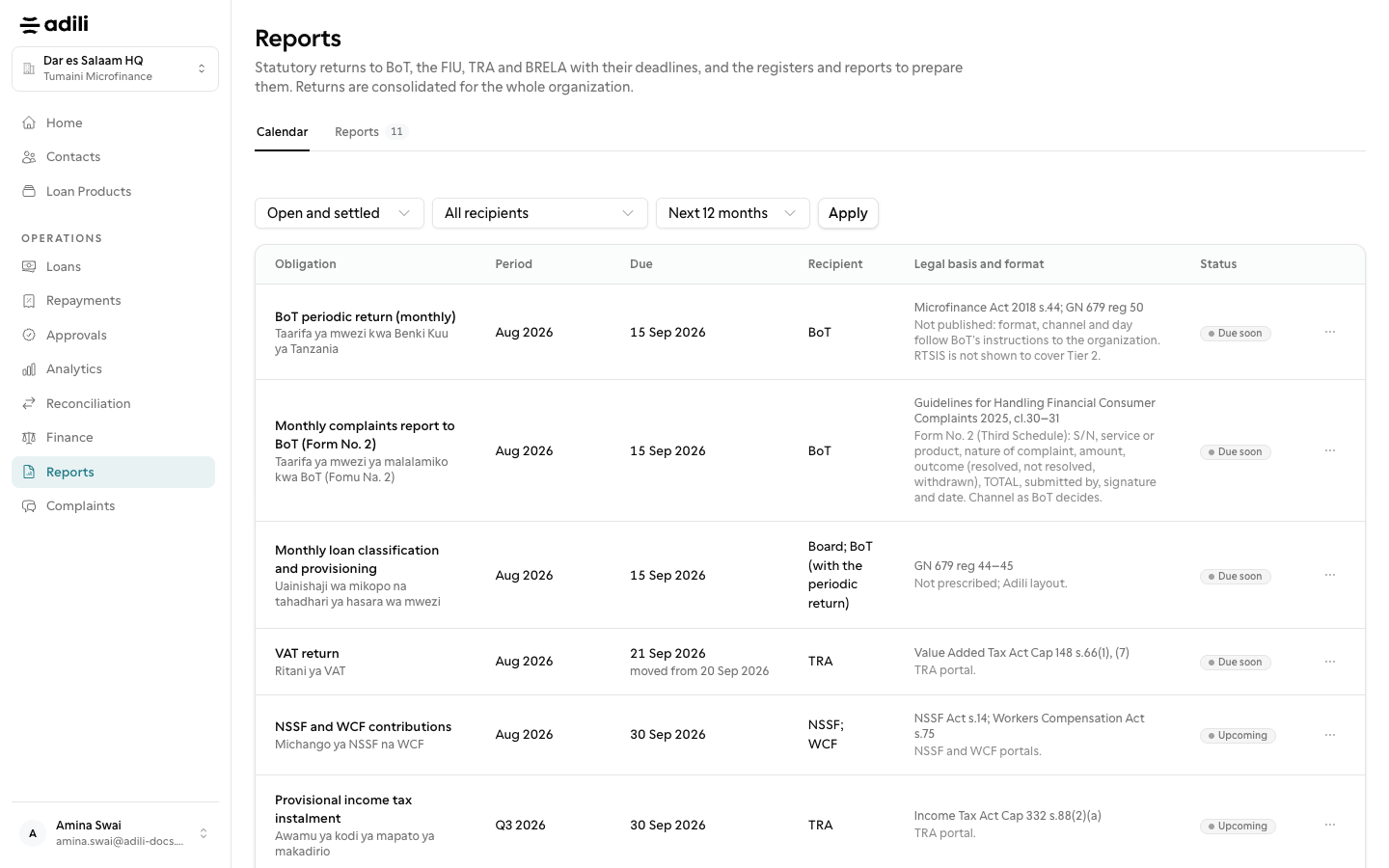
    Under Reports, the Calendar tab lists obligations twelve months ahead with recipient, due date and status. A date moved off a weekend or public holiday shows the statutory date it moved from.

  3. 3

    Mark it submitted

    Owners and admins record the submission date, reference, notes and the regulator's acknowledgement file. Reminders go out 14, 7 and 1 days before and when overdue.
See it in Adili

Follow the screen, step by step

The examples use safe training data. Names and amounts in your account will be different.

Complete the settings

1 Complete the settings

What to do

  1. 1. Fill in Settings → Compliance so the calendar knows your licence, tax numbers and cadences.
  2. 2. Under Reports, the Calendar tab lists obligations twelve months ahead with recipient, due date and status. A date moved off a weekend or public holiday shows the statutory date it moved from.
  3. 3. Owners and admins record the submission date, reference, notes and the regulator's acknowledgement file. Reminders go out 14, 7 and 1 days before and when overdue.

You should see

No setup items are waiting.